











New 1:many cadences with automated emails, reusable templates, and more in Signal

DonorSearch identifies prospects in your database with the capacity and intent to give.

Missed the live session? Watch our on-demand webinars anytime to get guidance from industry experts.

Advanced Google Search Tips for Prospect Research

Google is vital to every prospect researcher. Whether you’re crafting event bios or developing a research profile, you’ll inevitably end up in Google to ensure you aren’t missing any news stories and other personal items of note about a prospect.

In today’s society, you’d be hard pressed to find someone who doesn’t know how to conduct a basic search in Google. As a researcher, however, it’s important to take advantage of Google’s “advanced” features to get the most relevant results when you’re looking into a prospect.

Here are a few tips and tricks that will help you Google your prospects more efficiently.

1. Name Variations

Make sure that you use common misspellings of the name of your prospect. For example, if your prospect’s name is Jonathan, search for Jonathan, Johnathan, Jonathon, Johnathon, John, and Jon.

2. Quotation Marks

To get exact matches for your search, use quotation marks around phrases and names. You’ll also want to search without quotation marks to find misspelled entries and entries in which a person might have included their maiden name or middle initial.


3. And

Use both “&” and “and” when searching for two people (as in the case of a husband and wife). Also be sure to use all variations of their names. For example, you might search John and Jane Smith as:

  • “John and Jane Smith”
  • “John & Jane Smith”
  • “Jane and John Smith”
  • “Jane & John Smith”

Each of the above searches will bring up different results.

Pro tip: Use “or” to conduct these searches at the same time.


4. Middle Names and Initials

Try searching with variations of a name that include the person’s middle name or middle initial.

5. Wildcards

Wildcards are exceptionally helpful if you have a prospect with a common name. For example, if you are researching Michael Jordan, not the basketball star, you could easily search for “Michael Jordan” -basketball -NBA (etc.), instead of simply “Michael Jordan.” Using the “-” removes that particular word or phrase from your search results so that you get:


Instead of:


From the “Michael Jordan” search, you can quickly scan the results to find other words you might want to remove, such as “stats,” “ESPN,” and “player.”

Here’s a quick breakdown of the wildcards that you can use in Google.

6. Search a Specific Site

Sometimes, you might want to search a specific site instead of searching Google as a whole. For instance, you might want to search for the prospect’s name within your institution’s website or within a specific company website.

Let’s say I want to search for mentions of my name on the EverTrue website. I’ll want to type in site:evertrue.com “Emily Davis” so that I only get results from the EverTrue website.


7. Use Google Images to Find a Better Version of a Photo

Often, as researchers, we’re able to locate pictures of prospects—but sometimes, these pictures are too small to be used on our profiles. One of the quickest ways to find a better quality version is to use Google Images. Simply save the photo to your desktop and then upload it to Google Images. The search results will present you with identical and similar photos.

Related: Creative Ways to Discover New Prospects

These are only a few of the techniques that can help you to better navigate Google as a prospect researcher. To learn more, I suggest completing Google’s online searching courses and checking out this handy tips sheet.

Do you have any favorite Google tips and tricks? If so, send me an email or find me on Twitter and share them with me!


Emily Davis began as a research associate at the Indiana University Foundation and was promoted to development analyst in 2011. In addition to assisting her science- and health-related clients with research, she has completed research for the IU and IU Foundation presidents as well as on international prospects. She received her undergraduate degrees from Ball State University and her master’s degree from Indiana University Bloomington. In her free time, she enjoys completing freelance editing and formatting work when not watching Thomas the Train with her toddler.
Endowment Spending & Growth Calculator

Enter your fund's current value and adjust the return, spending, and inflation sliders to see how its value in today's dollars changes over time.

$
6.0%
0%12%
4.0%
2%7%
3.0%
0%8%
10
5 yrs25 yrs

Value in 10 years

$0

In today's dollars

$0

4. Continue to Steward Donors

Your relationship with the donors who give to your endowment doesn’t end when you secure their gifts. Because your endowment exists to make a difference in the long term, your supporters will want you to keep in touch about its progress. Ongoing stewardship means keeping donors updated about your endowment’s performance and impact. A report that strengthens your relationship with donors should cover:
  • The fund’s balance at the start and end of the year
  • Spending amounts and allocations
  • How the fund’s returns compare to your investment targets
  • A short narrative detailing the specific impacts the endowment achieved
Create a report for each endowment rather than sending an identical document to everyone. A donor who endowed a scholarship wants to hear about the students it supported, while a donor who endowed a building fund wants updates on construction projects.

5. Upgrade Your Endowment Management Tools

Your endowment management tools should make applying your spending policy across every fund easy. Investing in dedicated software is especially useful as your endowment grows. Handling unitization in spreadsheets might work for a few funds, but as you begin to manage dozens or hundreds of gifts, dedicated software can save your team time spent manually calculating gains and losses for each one.

Why Nonprofits Need Dedicated Endowment Management Software

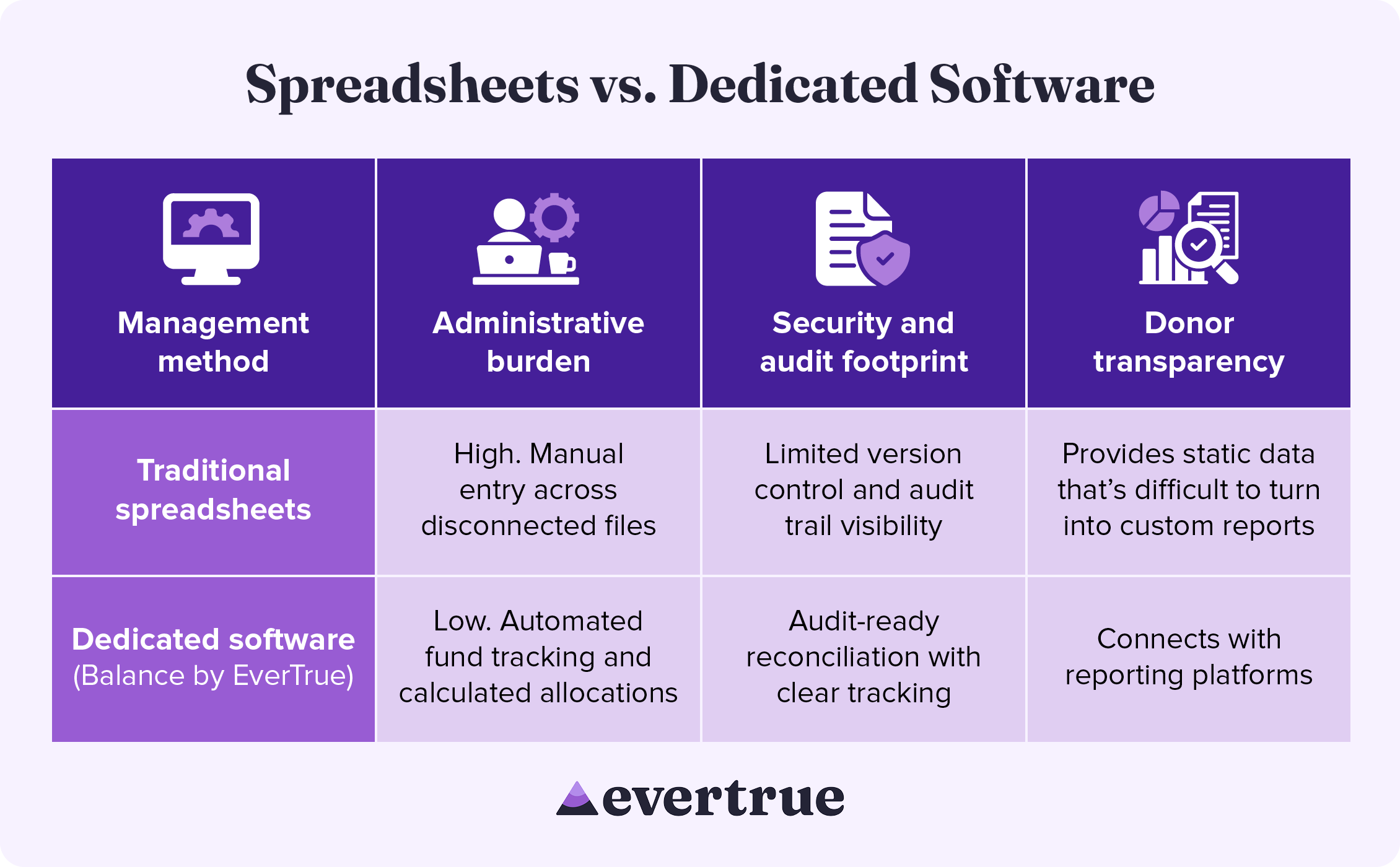
Dedicated endowment software brings accuracy and consistency to every part of the management process, from tracking individual funds to improving security. See how these solutions compare to a spreadsheet-based approach: nfographic table outlining the information below.

How These Methods Compare:

In managing your endowment with traditional spreadsheets, you may see:
  • High administrative burden: Manual entry across disconnected systems
  • Limited security and audit footprints: Reduced version control and audit trail visibility
  • Difficulty with donor transparency: Spreadsheets provide only static data that is difficult to turn into custom results.
By using dedicated software, you are likely to find the following improvements:
  • Lower administrative burden: Automated fund tracking and calculated allocations
  • Enhanced security and audit footprint: Audit-ready reconciliation with clear tracking
  • Greater donor transparency: Connects with reporting platforms
Dedicated endowment management software keeps your organization compliant while freeing up the time your team once spent manually managing spreadsheets.

Secure Your Endowment with Balance by EverTrue

Effective endowment management begins with excellent accounting. Balance by EverTrue handles unitization, applies spending rules, and produces audit-ready reports, so your team can spend more time on the donor relationships that built the fund in the first place.
  • Turn your data into a clear picture of long-term impact. Combine accurate fund accounting with donor reporting that showcases impact.
  • Connect with the tools you already use. Pair Balance with Impact by EverTrue and ODDER by EverTrue to create and deliver compelling digital endowment reports that you can send to donors with ease.
  • Know where every fund stands in real time. Check market values, gift history, and available spending for any fund. Then, share view-only versions with your team, so everyone stays informed.
With Balance, your team can stop spending all your time on manual management and instead add balance to your endowment workflow.

Additional Resources

To learn more about managing your endowment and other ways that technology can help your organization, check out these additional resources: Less stress, higher endowment funds. Discover how Balance provides the organization, security, and accuracy your endowment needs. Request a demo.
0 0 votes
Article Rating
Subscribe
Notify of
guest
0 Comments
Oldest
Newest Most Voted
Inline Feedbacks
View all comments
0
Would love your thoughts, please comment.x
()
x