














New 1:many cadences with automated emails, reusable templates, and more in Signal

DonorSearch identifies prospects in your database with the capacity and intent to give.

Missed the live session? Watch our on-demand webinars anytime to get guidance from industry experts.

April Product Update: Here’s What New in EverTrue This Month

It’s April and you’re working hard with just a few months left in the 2016-17 fiscal year. To make your job easier as you close out the year, this month’s product update focuses on features that’ll help you save time and optimize efforts in the home stretch.

See below for the complete release notes and let us know what you think!

(If you haven’t already, check out these quick and easy ideas for using EverTrue to crush annual fund goals this FY.)

Add Constituents to a List in Bulk

You asked and we delivered! Building an email, event, or trip list in EverTrue is now easier than ever. After you’ve performed a search, it’s possible to add all of the constituent results—not just 50 at a time—to a new or existing list.

Once you have your search results, all you have to do is click on the “Add all…” dropdown near the top left and select a list (or create a new one) to add the constituents to. You’ll see a progress bar at the top right as the constituents get added.
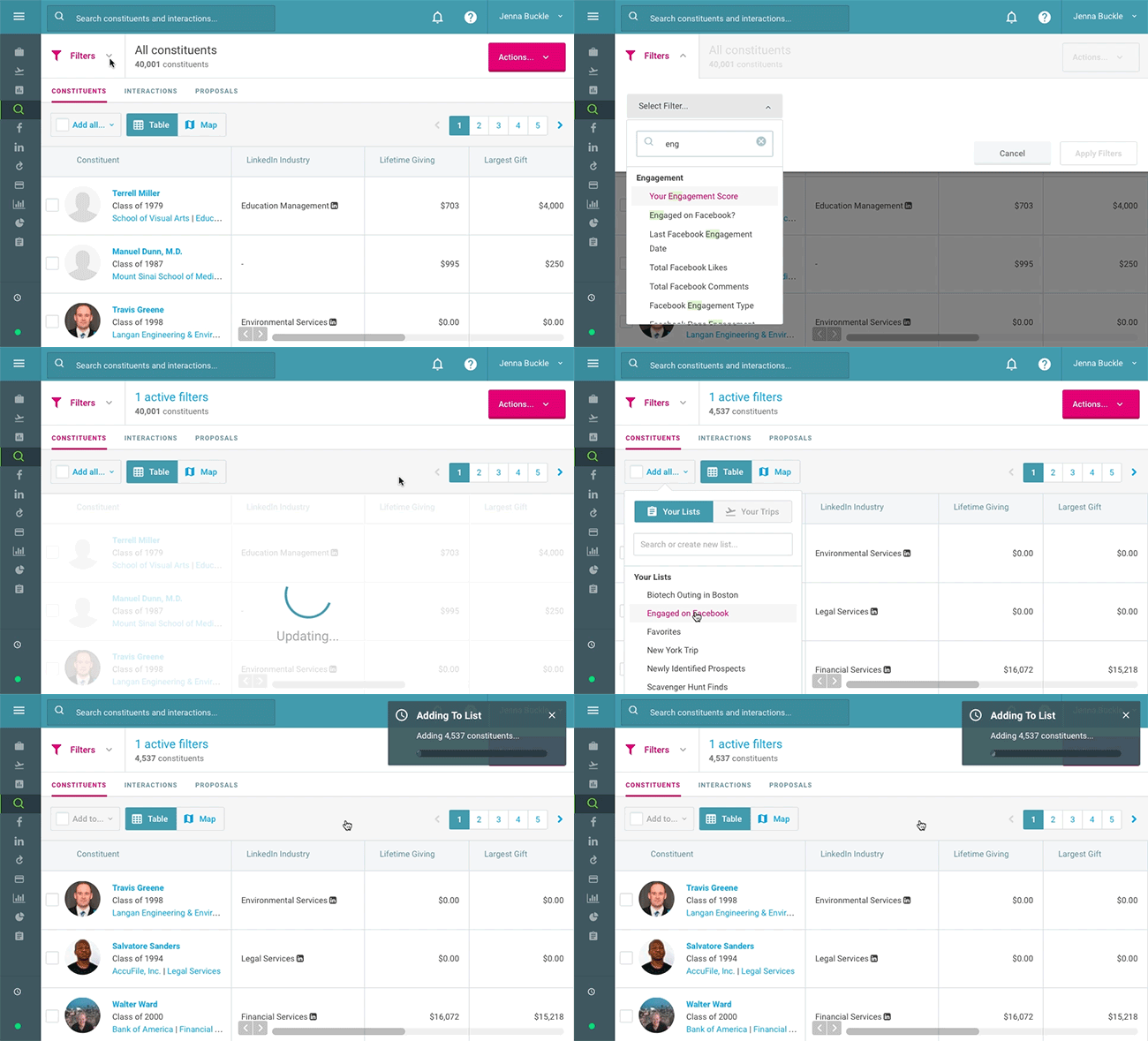
Build add to list


Ryan Marshall, prospect development analyst at Concordia University, St. Paul, shared how he plans on using bulk-add-to-list:

[show-testimonials alias=’concordia-2′]

Find Lists, Trips, and Constituents Using iOS Spotlight Search

Jump right to the list or trip you’ve been working on without all of the steps in between. The EverTrue iOS app now supports Spotlight Search, so you can find a list, trip, or constituent from the home screen on your device.

Just swipe down from the middle of the home screen; enter a list, trip, or constituent name in the Search field; and tap on a result to open it in the EverTrue app.

Spotlight Search - EverTrue


A few other iOS updates from this month:

  • Text message constituents directly from their profiles. Just tap on the “Text” icon and choose the constituent’s mobile phone number (if available).
  • The map search now defaults to “all locations” instead of “near me.”
  • View other EverTrue users’ trips and portfolios in addition to your own.
  • See Top Fields and Zestimates on constituent profiles.
  • If your organization uses EverTrue for online giving, you can easily copy a giving page URL to send to a constituent. From a profile, tap on the dot menu at the top right and then “Copy giving page link.” Choose a specific page and EverTrue will copy the URL to your clipboard so you can paste it in an email or text message.


Measure and Manage Frontline Team Performance

How many visits have I completed this fiscal year? How many prospect interactions have I had—and how does that compare to other members of my team? Am I on track to meet my goals?

With the new My Team dashboard, EverTrue provides powerful reporting and analytics on gift officer activity. Gift officers can access intuitive reports on visits, meetings, interactions, and proposals and see how they stack up against team members. Advancement leadership can drill down reports by solicitor and date to measure team performance against key goals and increase fundraising efficiency.
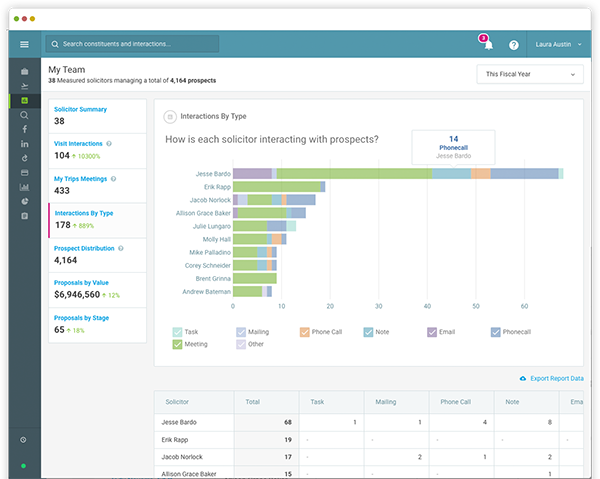
Team Performance Analytics - EverTrue


Contact us via the chat widget at the bottom left of your screen to learn more about gaining access to Team Performance Analytics for your development team.

Save Giving Page Images in an Asset Library

We heard that it was a hassle to re-upload images and logos when creating similar online giving pages, so we added an asset library that stores your image uploads. Now, whenever you upload a header, background, or logo image, it will automatically save in the asset library. You can easily select images from the library when you’re building a new page.
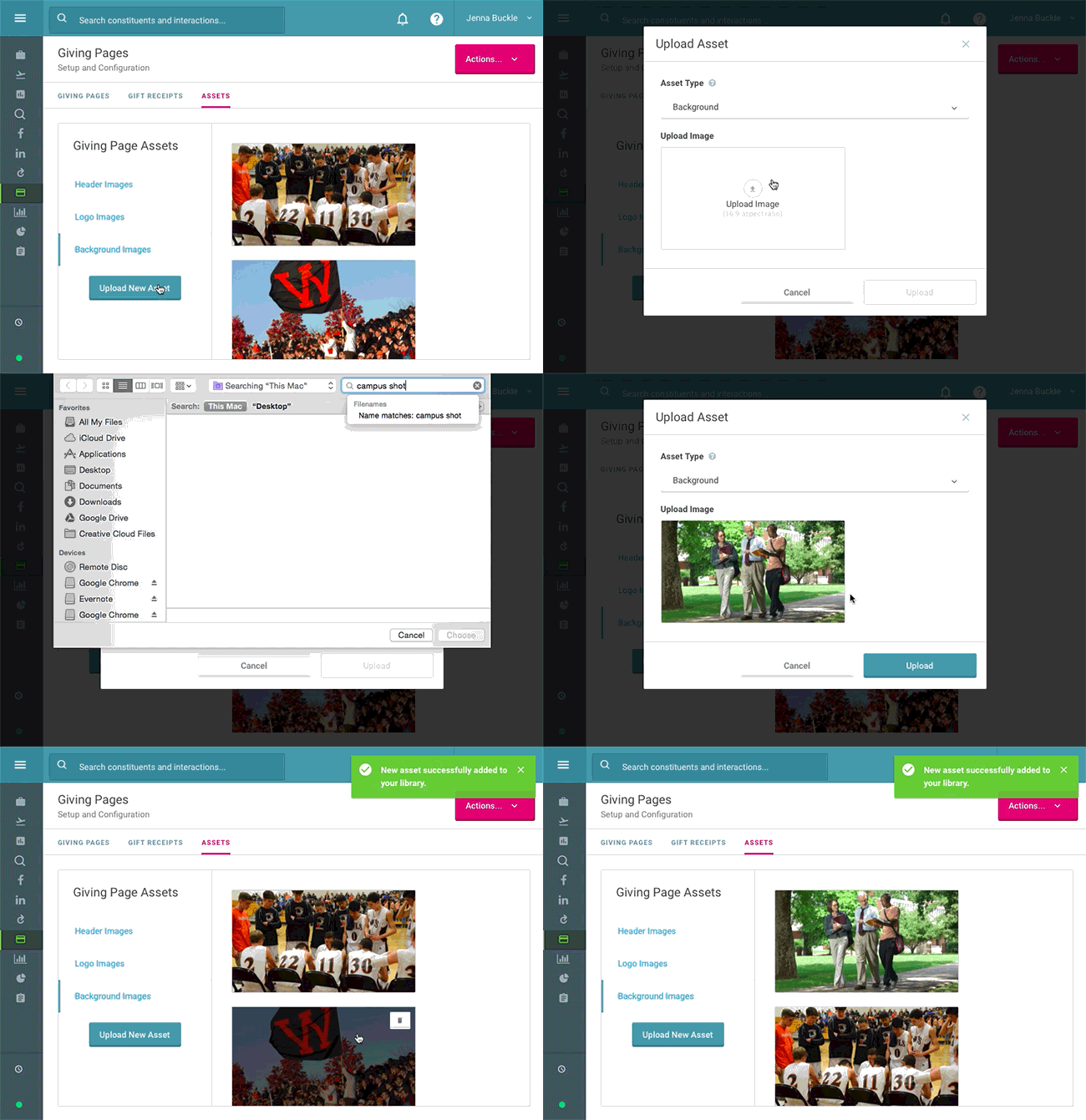
Giving Page Asset Library - EverTrue


But that’s not it: we also enhanced the flow for configuring a new giving page! Check out details and a short video here.

Customize Your Gift Receipts

Thank your donors in style. You’ve already created a beautiful online giving experience; now make sure your gift receipts look great, too. Now you have even more customization options for the receipts donors receive when they make a gift through one of your EverTrue pages.

Just head over to the Gift Receipts tab from your Giving Pages dashboard and click “Create New Receipt.” You’ll be able to edit the sender name, subject line, header image, and body of the receipt. Then you can link the receipt to one or more giving pages. For more detailed instructions and a video walkthrough, click here.
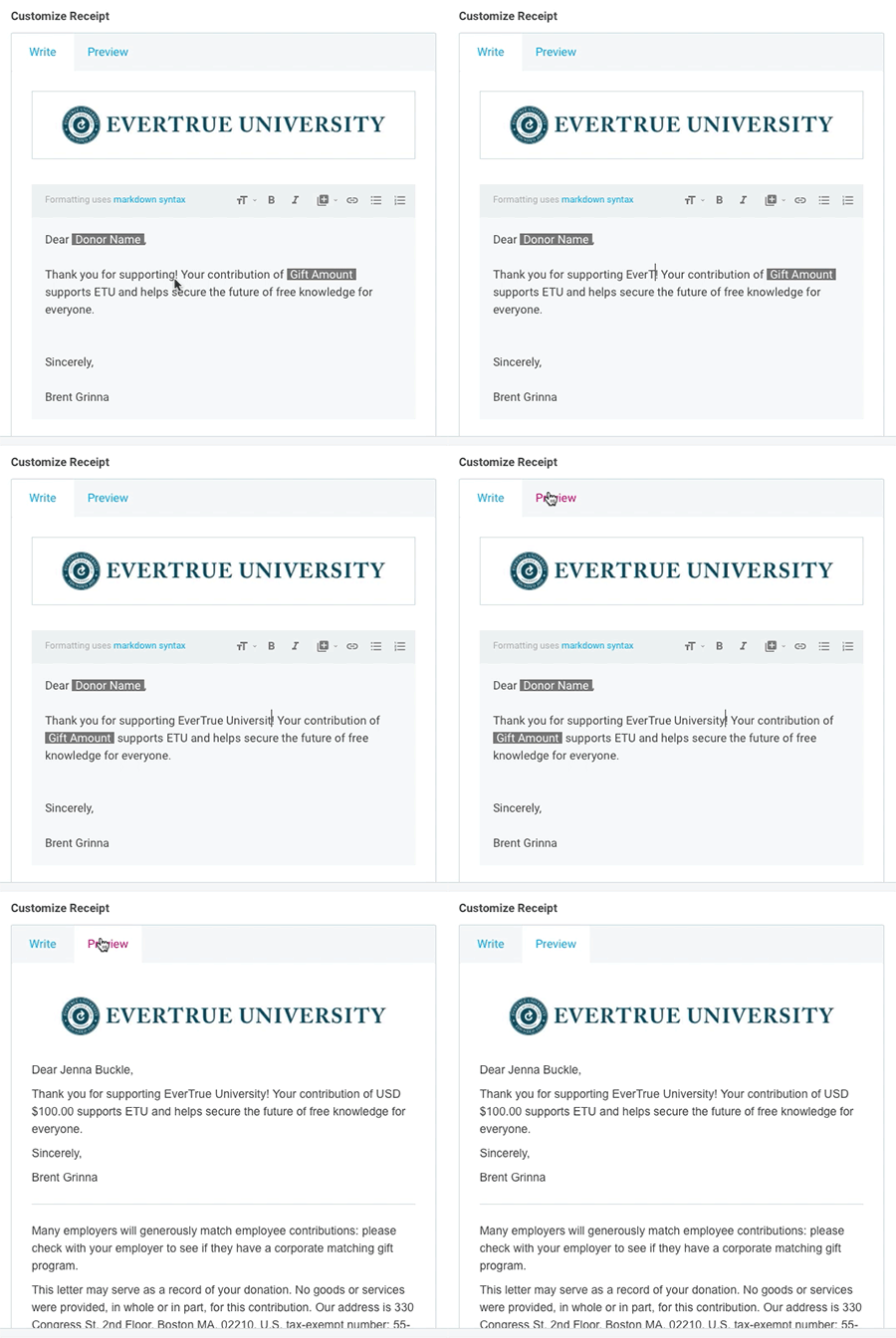
Custom Gift Receipt - EverTrue


As always, we’re here to help. Let us know if you have questions about any of the new features and functionality.
Join us at Raise 2017 from July 27-28 in Boston for the advancement conference of the year! Registration is open now.

Endowment Spending & Growth Calculator

Enter your fund's current value and adjust the return, spending, and inflation sliders to see how its value in today's dollars changes over time.

$
6.0%
0%12%
4.0%
2%7%
3.0%
0%8%
10
5 yrs25 yrs

Value in 10 years

$0

In today's dollars

$0

4. Continue to Steward Donors

Your relationship with the donors who give to your endowment doesn’t end when you secure their gifts. Because your endowment exists to make a difference in the long term, your supporters will want you to keep in touch about its progress. Ongoing stewardship means keeping donors updated about your endowment’s performance and impact. A report that strengthens your relationship with donors should cover:
  • The fund’s balance at the start and end of the year
  • Spending amounts and allocations
  • How the fund’s returns compare to your investment targets
  • A short narrative detailing the specific impacts the endowment achieved
Create a report for each endowment rather than sending an identical document to everyone. A donor who endowed a scholarship wants to hear about the students it supported, while a donor who endowed a building fund wants updates on construction projects.

5. Upgrade Your Endowment Management Tools

Your endowment management tools should make applying your spending policy across every fund easy. Investing in dedicated software is especially useful as your endowment grows. Handling unitization in spreadsheets might work for a few funds, but as you begin to manage dozens or hundreds of gifts, dedicated software can save your team time spent manually calculating gains and losses for each one.

Why Nonprofits Need Dedicated Endowment Management Software

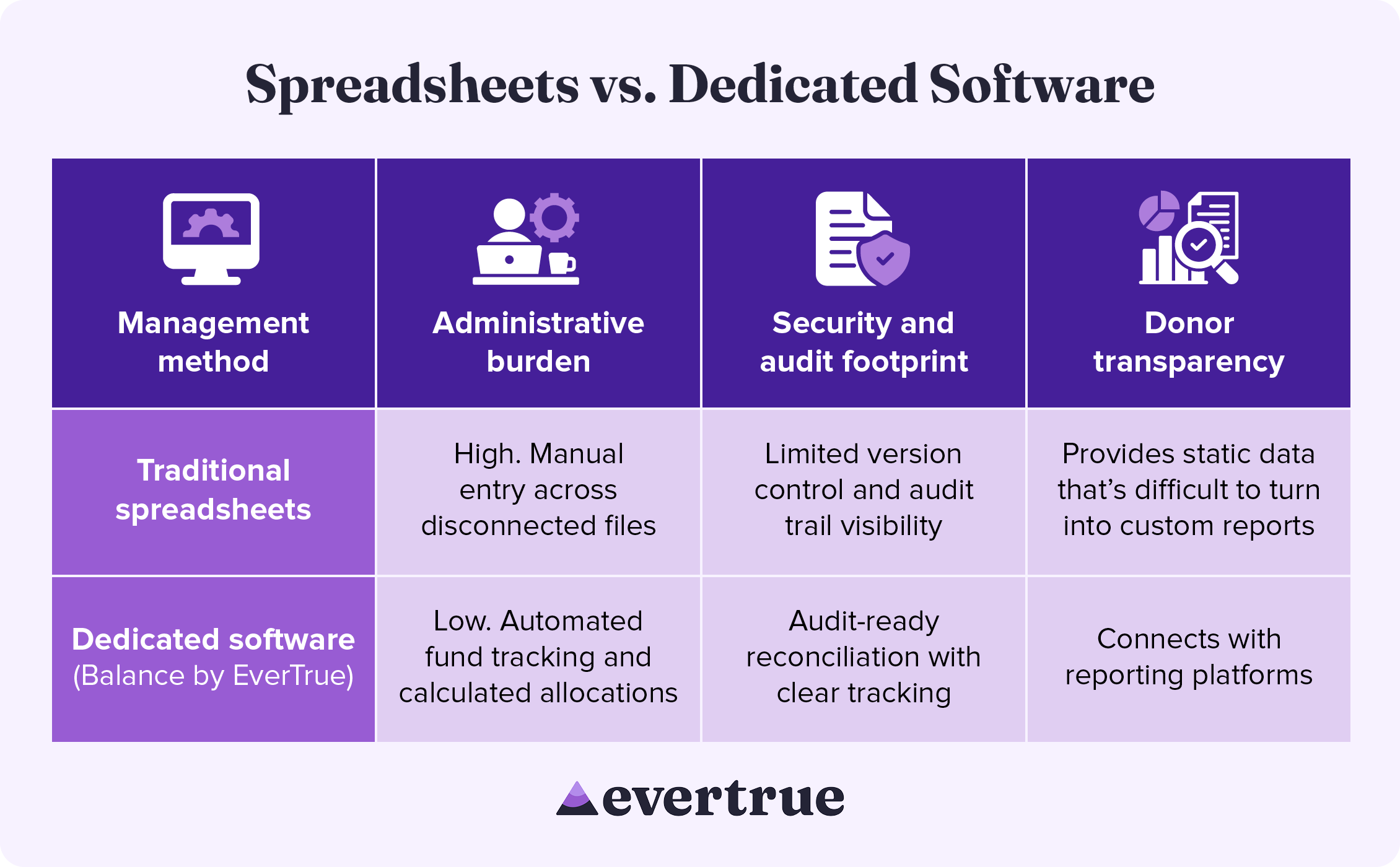
Dedicated endowment software brings accuracy and consistency to every part of the management process, from tracking individual funds to improving security. See how these solutions compare to a spreadsheet-based approach: nfographic table outlining the information below.

How These Methods Compare:

In managing your endowment with traditional spreadsheets, you may see:
  • High administrative burden: Manual entry across disconnected systems
  • Limited security and audit footprints: Reduced version control and audit trail visibility
  • Difficulty with donor transparency: Spreadsheets provide only static data that is difficult to turn into custom results.
By using dedicated software, you are likely to find the following improvements:
  • Lower administrative burden: Automated fund tracking and calculated allocations
  • Enhanced security and audit footprint: Audit-ready reconciliation with clear tracking
  • Greater donor transparency: Connects with reporting platforms
Dedicated endowment management software keeps your organization compliant while freeing up the time your team once spent manually managing spreadsheets.

Secure Your Endowment with Balance by EverTrue

Effective endowment management begins with excellent accounting. Balance by EverTrue handles unitization, applies spending rules, and produces audit-ready reports, so your team can spend more time on the donor relationships that built the fund in the first place.
  • Turn your data into a clear picture of long-term impact. Combine accurate fund accounting with donor reporting that showcases impact.
  • Connect with the tools you already use. Pair Balance with Impact by EverTrue and ODDER by EverTrue to create and deliver compelling digital endowment reports that you can send to donors with ease.
  • Know where every fund stands in real time. Check market values, gift history, and available spending for any fund. Then, share view-only versions with your team, so everyone stays informed.
With Balance, your team can stop spending all your time on manual management and instead add balance to your endowment workflow.

Additional Resources

To learn more about managing your endowment and other ways that technology can help your organization, check out these additional resources: Less stress, higher endowment funds. Discover how Balance provides the organization, security, and accuracy your endowment needs. Request a demo.
0 0 votes
Article Rating
Subscribe
Notify of
guest
0 Comments
Oldest
Newest Most Voted
Inline Feedbacks
View all comments
0
Would love your thoughts, please comment.x
()
x