













New 1:many cadences with automated emails, reusable templates, and more in Signal

DonorSearch identifies prospects in your database with the capacity and intent to give.

Missed the live session? Watch our on-demand webinars anytime to get guidance from industry experts.

How to Use Metrics to Build Smarter Lists

ThankView features an engagement score that makes it easy to know who your most engaged and active recipients are. Each newly uploaded recipient starts with a neutral score of 3 stars attached to their email address or phone number.

Before we dive into using these scores to build smarter lists, let’s take a look at how our algorithm calculates a recipients metric score. This article will also take a look at the different ways to engage your recipients and build smarter saved lists of recipients, all based on their level of engagement.

From start to finish, here is how the engagement score total calculates your user’s interaction:

A recipient does not open your ThankView — The score generally drops 1 star for every ThankView unopened.

A recipient opens the ThankView but does not click play — The score slightly drops. Generally, the score stays at the same star rating unless it happens over several ThankViews.

A recipient clicks play to start watching their ThankView video— The score will not change.

A recipient watches the ThankView video — The score will slightly increase as the recipients watch more of the video.

A recipient finishes the ThankView video — The score will increase a fair amount. They will be marked as a 4-star recipient if it’s their first video. Their score will increase to 5-stars after watching several ThankViews to the end.

A recipient clicks the CTA button or a secondary button such as “Reply”, or “Share” — The score greatly increases. Their score will go to 5 stars even if it’s their first ThankView.

As you can see, our algorithm rewards recipients more than it lowers their score. But can these stars help you build smarter lists? Let’s break it down.
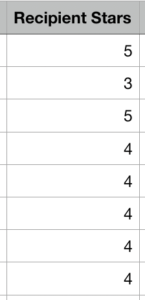
Example of recipient stars column

When you download the metrics .csv file, there is a column that shows the engagement score total for each recipient.

The next step is to filter and sort each recipient by their engagement score total. We recommend building three separate campaign lists:

  • 1 and 2-star recipients
  • 3-star recipients
  • 4 and 5-star recipients

Here are some great ideas for how to tailor your campaign for each list.

4 and 5-Star Engagement

We recommend treating these recipients like the all-stars they are! Make them feel special with behind the scenes access to your latest projects and follow up ThankViews created just for them!

These are the recipients that are most likely to click your CTA or share your message. Make sure to reward them for engaging with you and helping you and your organization achieve your mission.

3- Star Engagement

These recipients are consistently watching your ThankView videos (nice job!), but have yet to click that Call to Action button or any of the secondary actions. What are some of the best ways to increase their engagement?

Be sure to call out those secondary action links in the video! Let them know what’s beneath the amazing personalized video you’ve sent them.

Lower Star Engagement (1–2 Stars)

Your recipients with 1-2 star engagement scores have not opened or clicked through the past few ThankViews that you’ve sent. But never fear, you may just need to try a new way of reaching out!

We recommend spacing out the ThankView campaigns so a recipient is not receiving more than 1 every 2–3 months.

To reengage your 1 or 2-star engagement recipients, try resending with a new subject line including their name, their major, their last gift donation amount. The more specific the better!

Consider segmenting these recipients into a smaller list and creating a campaign that features videos specifically created for each individual.

After months of no engagement, if you have no responses or clicks from these recipients, it’s a great idea to implement a sunset policy. A sunset policy is a best practice that removes those from your list that have not engaged with your email outreach in the past 6–12 months. This removes stale emails and over time and will improve your overall engagement metrics.

And there you have it! The magic’s in the stars! For your next campaign, test segmenting your lists with the engagement score. Let us know about your campaigns, your questions, heck, even what you had for lunch. We want to hear from you!

Endowment Spending & Growth Calculator

Enter your fund's current value and adjust the return, spending, and inflation sliders to see how its value in today's dollars changes over time.

$
6.0%
0%12%
4.0%
2%7%
3.0%
0%8%
10
5 yrs25 yrs

Value in 10 years

$0

In today's dollars

$0

4. Continue to Steward Donors

Your relationship with the donors who give to your endowment doesn’t end when you secure their gifts. Because your endowment exists to make a difference in the long term, your supporters will want you to keep in touch about its progress. Ongoing stewardship means keeping donors updated about your endowment’s performance and impact. A report that strengthens your relationship with donors should cover:
  • The fund’s balance at the start and end of the year
  • Spending amounts and allocations
  • How the fund’s returns compare to your investment targets
  • A short narrative detailing the specific impacts the endowment achieved
Create a report for each endowment rather than sending an identical document to everyone. A donor who endowed a scholarship wants to hear about the students it supported, while a donor who endowed a building fund wants updates on construction projects.

5. Upgrade Your Endowment Management Tools

Your endowment management tools should make applying your spending policy across every fund easy. Investing in dedicated software is especially useful as your endowment grows. Handling unitization in spreadsheets might work for a few funds, but as you begin to manage dozens or hundreds of gifts, dedicated software can save your team time spent manually calculating gains and losses for each one.

Why Nonprofits Need Dedicated Endowment Management Software

Dedicated endowment software brings accuracy and consistency to every part of the management process, from tracking individual funds to improving security. See how these solutions compare to a spreadsheet-based approach: nfographic table outlining the information below.

How These Methods Compare:

In managing your endowment with traditional spreadsheets, you may see:
  • High administrative burden: Manual entry across disconnected systems
  • Limited security and audit footprints: Reduced version control and audit trail visibility
  • Difficulty with donor transparency: Spreadsheets provide only static data that is difficult to turn into custom results.
By using dedicated software, you are likely to find the following improvements:
  • Lower administrative burden: Automated fund tracking and calculated allocations
  • Enhanced security and audit footprint: Audit-ready reconciliation with clear tracking
  • Greater donor transparency: Connects with reporting platforms
Dedicated endowment management software keeps your organization compliant while freeing up the time your team once spent manually managing spreadsheets.

Secure Your Endowment with Balance by EverTrue

Effective endowment management begins with excellent accounting. Balance by EverTrue handles unitization, applies spending rules, and produces audit-ready reports, so your team can spend more time on the donor relationships that built the fund in the first place.
  • Turn your data into a clear picture of long-term impact. Combine accurate fund accounting with donor reporting that showcases impact.
  • Connect with the tools you already use. Pair Balance with Impact by EverTrue and ODDER by EverTrue to create and deliver compelling digital endowment reports that you can send to donors with ease.
  • Know where every fund stands in real time. Check market values, gift history, and available spending for any fund. Then, share view-only versions with your team, so everyone stays informed.
With Balance, your team can stop spending all your time on manual management and instead add balance to your endowment workflow.

Additional Resources

To learn more about managing your endowment and other ways that technology can help your organization, check out these additional resources: Less stress, higher endowment funds. Discover how Balance provides the organization, security, and accuracy your endowment needs. Request a demo.
0 0 votes
Article Rating
Subscribe
Notify of
guest
0 Comments
Oldest
Newest Most Voted
Inline Feedbacks
View all comments
0
Would love your thoughts, please comment.x
()
x