











New 1:many cadences with automated emails, reusable templates, and more in Signal

DonorSearch identifies prospects in your database with the capacity and intent to give.

Missed the live session? Watch our on-demand webinars anytime to get guidance from industry experts.

Ask The EverCrew: What Are Your Favorite Features?

As we started thinking back on 2018, we began to wonder which EverTrue features our own team liked the most. Yes, they’re all near and dear to our heart and we probably shouldn’t pick favorites, but…well, that’s exactly what we decided to do.

And who better to ask than our very own Customer Success Mangers? These customer champions are in constant communication with our partners, making sure they’re reaching fundraising goals by getting the most out of EverTrue. And when they’re not doing that, they’re most likely in the product itself.

So, we asked them which one feature stuck out to them the most this past year and why. Here’s what they told us about their favorite features.

Meggie: Detailed Giving Information

One of the biggest customer feedback items that we heard was the need for further giving detail to segment, prospect, and quickly review a profile. Well, ask and you shall receive!

This year, the team released two additional giving models to amplify the donor profile in EverTrue. The first is Categorized Giving which allows your team to send EverTrue buckets of giving information like Annual Fund, Athletics, Capital, etc. The second is Gift Transactions which allows for all gift details like designations and campaign credit. I think this addition was a game-changer for EverTrue as it allows you to target past donors to a specific designation seamlessly as well as prospect with access to all giving information.

Meghan L: Volunteer by EverTrue

We launched the new module this year, and it was exciting to see ALL the features that rolled out with it. The tool arms members of your community with the information they need to do the work you’ve asked them to complete. That’s everything from class agents making solicitations for annual giving programs, alums securing registrations for upcoming reunions, students making donor thank you calls, trustees making contact with your best supporters, and more.

Volunteer equips those individuals with tools to do their job AND allows administrators to monitor their progress. It’s easily available on iPhone, Android, and web plus it’s equipped with gift notifications, group text, granular reporting, and internal messaging tools. We’ve already seen Volunteer help schools like Wheaton College, the Millbrook School, Notre Dame, and Williams College surpass their goals!

Meghan B: Radius on a Map

This new feature is so helpful for trip planning and event venue shopping. Salisbury School recently used it to find a venue for an event in San Francisco. By applying the radius, they narrowed down their target invite list and realized that a majority of their constituents in San Francisco all worked in the same building. With that information in hand, they chose a bar right next door and had a higher attendance rate than anticipated.

Caroline: Eventbrite integration

I love this feature because it’s an additional engagement point that ALL users can access. We’ll match an attendee to their profile which allows you to push this information to gift officers when their assignments are mapped. You can also capture new email addresses through manual matching. Since they’ve started using the Eventbrite integration, St. Edward’s has increased their event attendance and decreased their no-shows for major events on campus.

Courtney: Contact Report Search

I love this feature because it unlocks valuable contact report data that has been hidden for years in the back closet of your database. For new Gift Officers getting up and running, or Gift Officers (and Researchers) doing discovery work to identify donors interested in a specific topic, this feature allows you to essentially Google search across all your contact reports to surface new opportunities.

One of my favorite stories from this year was from a University of Rochester Gift Officer who used the Contact Report Search to look for the term “bequest.” EverTrue returned back a list of all prospects who had mentioned bequest to a gift officer; including a prospect who told a gift officer he was interested in a planned gift, but never actually made that gift. They contacted the prospect and helped him fulfill the bequest!

Tell us what your favorite EverTrue features were in 2018. And if you’re not currently using any of the ones we mentioned, we’d be happy to teach you more about it!
Endowment Spending & Growth Calculator

Enter your fund's current value and adjust the return, spending, and inflation sliders to see how its value in today's dollars changes over time.

$
6.0%
0%12%
4.0%
2%7%
3.0%
0%8%
10
5 yrs25 yrs

Value in 10 years

$0

In today's dollars

$0

4. Continue to Steward Donors

Your relationship with the donors who give to your endowment doesn’t end when you secure their gifts. Because your endowment exists to make a difference in the long term, your supporters will want you to keep in touch about its progress. Ongoing stewardship means keeping donors updated about your endowment’s performance and impact. A report that strengthens your relationship with donors should cover:
  • The fund’s balance at the start and end of the year
  • Spending amounts and allocations
  • How the fund’s returns compare to your investment targets
  • A short narrative detailing the specific impacts the endowment achieved
Create a report for each endowment rather than sending an identical document to everyone. A donor who endowed a scholarship wants to hear about the students it supported, while a donor who endowed a building fund wants updates on construction projects.

5. Upgrade Your Endowment Management Tools

Your endowment management tools should make applying your spending policy across every fund easy. Investing in dedicated software is especially useful as your endowment grows. Handling unitization in spreadsheets might work for a few funds, but as you begin to manage dozens or hundreds of gifts, dedicated software can save your team time spent manually calculating gains and losses for each one.

Why Nonprofits Need Dedicated Endowment Management Software

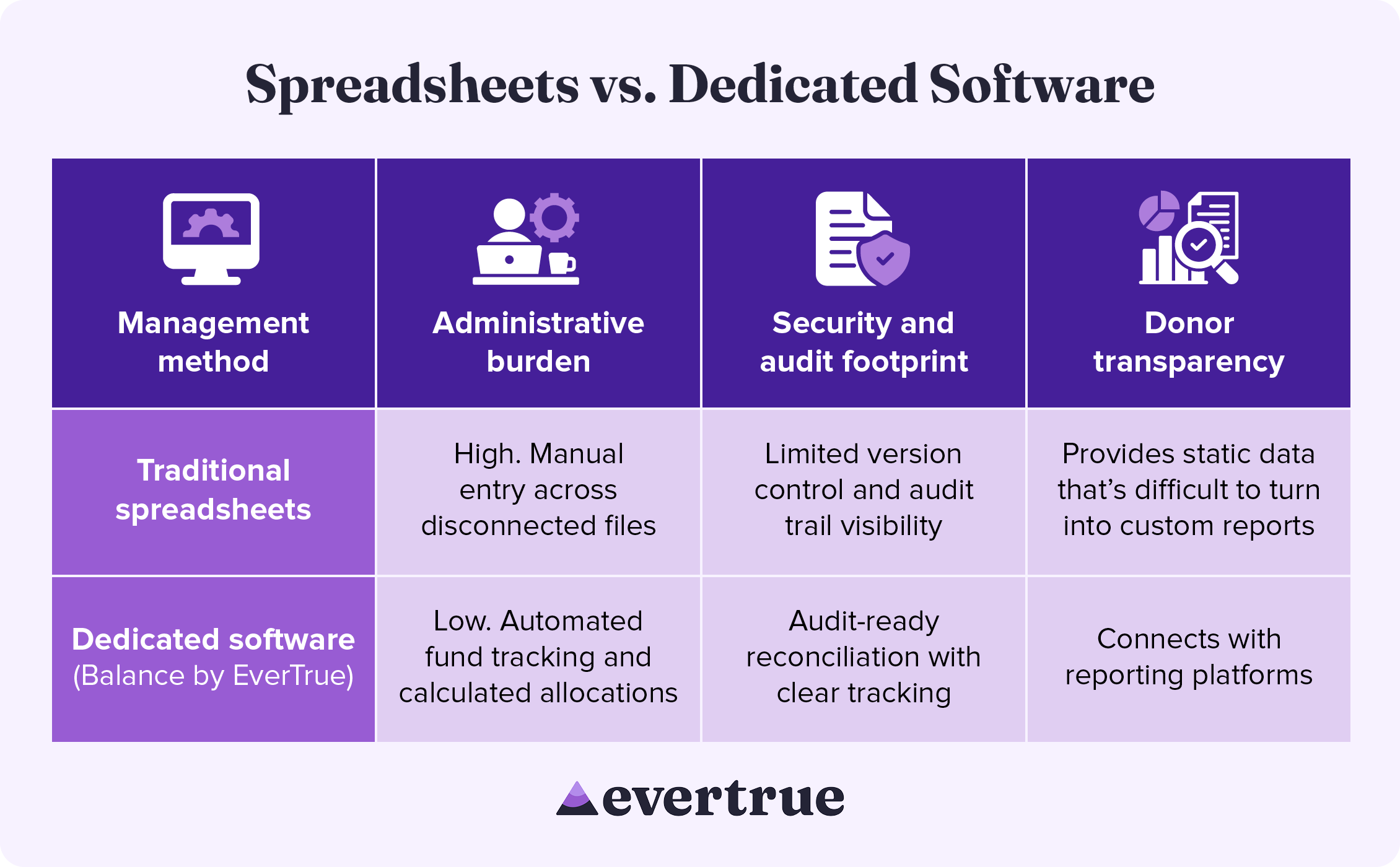
Dedicated endowment software brings accuracy and consistency to every part of the management process, from tracking individual funds to improving security. See how these solutions compare to a spreadsheet-based approach: nfographic table outlining the information below.

How These Methods Compare:

In managing your endowment with traditional spreadsheets, you may see:
  • High administrative burden: Manual entry across disconnected systems
  • Limited security and audit footprints: Reduced version control and audit trail visibility
  • Difficulty with donor transparency: Spreadsheets provide only static data that is difficult to turn into custom results.
By using dedicated software, you are likely to find the following improvements:
  • Lower administrative burden: Automated fund tracking and calculated allocations
  • Enhanced security and audit footprint: Audit-ready reconciliation with clear tracking
  • Greater donor transparency: Connects with reporting platforms
Dedicated endowment management software keeps your organization compliant while freeing up the time your team once spent manually managing spreadsheets.

Secure Your Endowment with Balance by EverTrue

Effective endowment management begins with excellent accounting. Balance by EverTrue handles unitization, applies spending rules, and produces audit-ready reports, so your team can spend more time on the donor relationships that built the fund in the first place.
  • Turn your data into a clear picture of long-term impact. Combine accurate fund accounting with donor reporting that showcases impact.
  • Connect with the tools you already use. Pair Balance with Impact by EverTrue and ODDER by EverTrue to create and deliver compelling digital endowment reports that you can send to donors with ease.
  • Know where every fund stands in real time. Check market values, gift history, and available spending for any fund. Then, share view-only versions with your team, so everyone stays informed.
With Balance, your team can stop spending all your time on manual management and instead add balance to your endowment workflow.

Additional Resources

To learn more about managing your endowment and other ways that technology can help your organization, check out these additional resources: Less stress, higher endowment funds. Discover how Balance provides the organization, security, and accuracy your endowment needs. Request a demo.
0 0 votes
Article Rating
Subscribe
Notify of
guest
0 Comments
Oldest
Newest Most Voted
Inline Feedbacks
View all comments
0
Would love your thoughts, please comment.x
()
x