










New 1:many cadences with automated emails, reusable templates, and more in Signal

DonorSearch identifies prospects in your database with the capacity and intent to give.

Missed the live session? Watch our on-demand webinars anytime to get guidance from industry experts.

What’s in a Name: Email Personalization For Alumni Engagement

In the legendary self-help book “How to Win Friends and Influence People”, Dale Carnegie writes that a person’s name is “to that person, the sweetest and most important sound in any language”.

What can advancement officers learn from Carnegie’s wisdom?

Simply put, the more personalization, the better. The more often you can tailor your communications to particular constituent, the better engagement you’ll see.

And for many institutions, email is the primary touch point for the vast majority of their constituents — 84% of higher ed advancement offices use email, as noted in a CASE Report on “The Use of Technology for Development and Alumni Relations“.

Related: 6 Best Practices for Fundraising Emails; Make Every Send Count

Getting Personal from your office – the “From” Section

Your team has probably spent tons of time and effort getting your alums’ email addresses and crafting campaigns designed to effectively market your institution. Don’t let all that work go to waste by forgetting to personalize your emails and include those magical tools – names.

In fact, a remarkable personalized email starts with the ‘From’ section and the subject line. In ‘From’, instead of just having your school’s name, include the name of your Director of Alumni Relations, for instance (in the style of “David, [school name]”). That way, your alums feel that a real person is reaching out to contact them rather than some monolithic email machine.

Wesleyan sends out an email to alumni athletes.

Personalizing Constituent Subject Lines

According to Marketing Sherpa, subject lines that contain personalization received only a slight advantage in open rates, but increased click through rates, on average, by a noticeable 17%. Beyond name, other personalization items, such as a location (e.g. Great News for our Boston Alumni!), are recommended.

Looking for inspiration? ExactTarget provides lots of great ideas for subject lines.

Personalizing Alumni Email Content

In HubSpot’s roundup of excellent examples of email personalization, every single email included the recipient’s name at the very top, in the “salutation” of the email. And while all of HubSpot’s examples were from businesses, the same principles apply for email marketing of all types.

So, at the top of every email coming from the advancement team, simply place the alum’s name in the greeting, such as “Hi David,”. Many mailing programs (for example, Constant Contact or MailChimp) make inserting names quite easy, usually in the form of “Hi FIRSTNAME”.

While it might be obvious to some alums that inserting names is automated, there’s a reason why the practice is so widespread in the corporate world – reading your own name makes you feel that the content was prepared just for you.

Getting Deeper – Targeted Alumni Marketing

There are so many possible layers of email personalization that it’s impossible to list them all. But as you plan your annual fund drives or event notices, think about how adding personalization based on alumni affiliations could boost your engagement.

For example, alums who participated in a certain sports team might be more engaged by a message from their former coach urging them to return for homecoming, rather than a generic message that you send to all your alums.

The possibilities are endless. All it takes is a little thought…and a name.
Endowment Spending & Growth Calculator

Enter your fund's current value and adjust the return, spending, and inflation sliders to see how its value in today's dollars changes over time.

$
6.0%
0%12%
4.0%
2%7%
3.0%
0%8%
10
5 yrs25 yrs

Value in 10 years

$0

In today's dollars

$0

4. Continue to Steward Donors

Your relationship with the donors who give to your endowment doesn’t end when you secure their gifts. Because your endowment exists to make a difference in the long term, your supporters will want you to keep in touch about its progress. Ongoing stewardship means keeping donors updated about your endowment’s performance and impact. A report that strengthens your relationship with donors should cover:
  • The fund’s balance at the start and end of the year
  • Spending amounts and allocations
  • How the fund’s returns compare to your investment targets
  • A short narrative detailing the specific impacts the endowment achieved
Create a report for each endowment rather than sending an identical document to everyone. A donor who endowed a scholarship wants to hear about the students it supported, while a donor who endowed a building fund wants updates on construction projects.

5. Upgrade Your Endowment Management Tools

Your endowment management tools should make applying your spending policy across every fund easy. Investing in dedicated software is especially useful as your endowment grows. Handling unitization in spreadsheets might work for a few funds, but as you begin to manage dozens or hundreds of gifts, dedicated software can save your team time spent manually calculating gains and losses for each one.

Why Nonprofits Need Dedicated Endowment Management Software

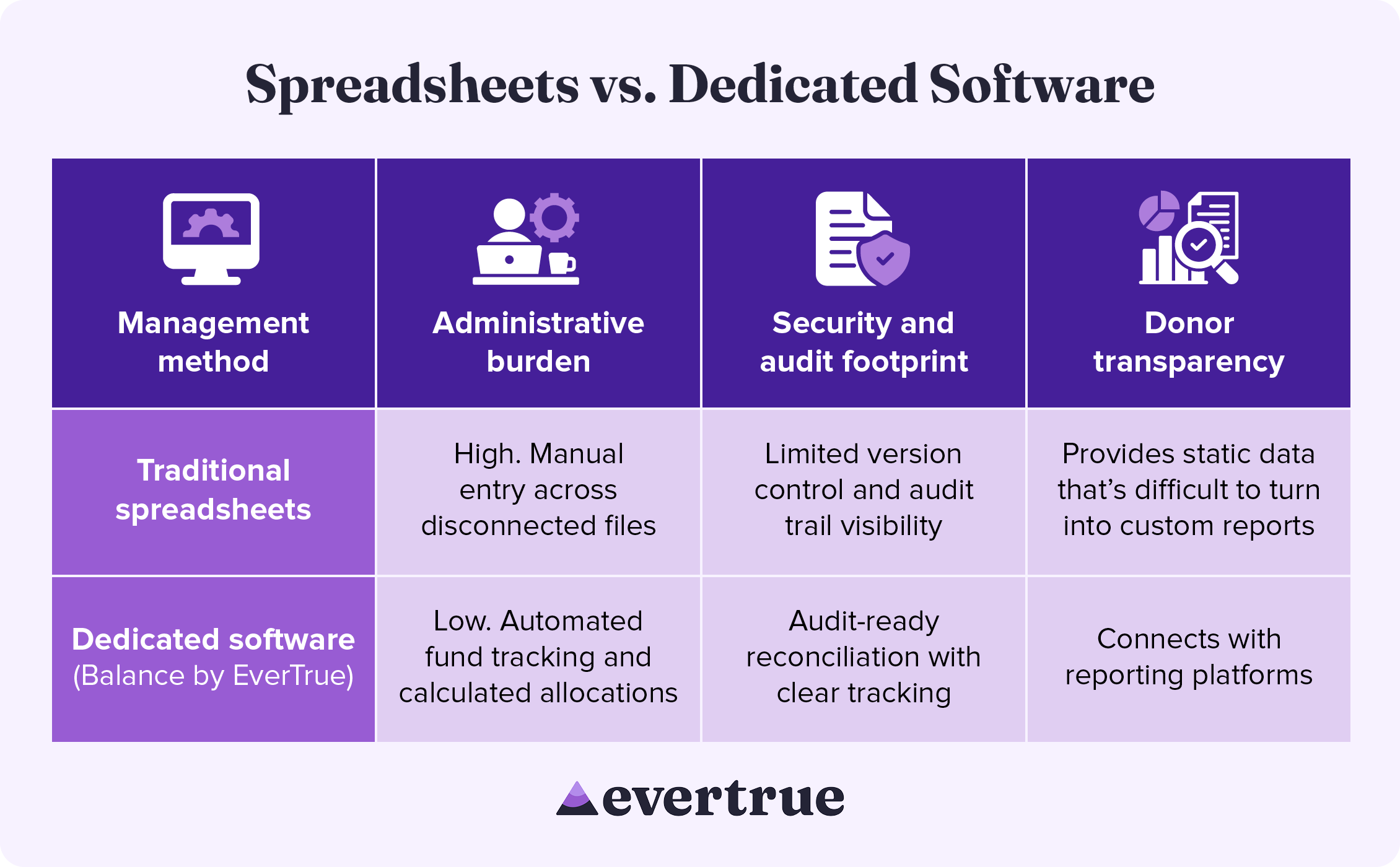
Dedicated endowment software brings accuracy and consistency to every part of the management process, from tracking individual funds to improving security. See how these solutions compare to a spreadsheet-based approach: nfographic table outlining the information below.

How These Methods Compare:

In managing your endowment with traditional spreadsheets, you may see:
  • High administrative burden: Manual entry across disconnected systems
  • Limited security and audit footprints: Reduced version control and audit trail visibility
  • Difficulty with donor transparency: Spreadsheets provide only static data that is difficult to turn into custom results.
By using dedicated software, you are likely to find the following improvements:
  • Lower administrative burden: Automated fund tracking and calculated allocations
  • Enhanced security and audit footprint: Audit-ready reconciliation with clear tracking
  • Greater donor transparency: Connects with reporting platforms
Dedicated endowment management software keeps your organization compliant while freeing up the time your team once spent manually managing spreadsheets.

Secure Your Endowment with Balance by EverTrue

Effective endowment management begins with excellent accounting. Balance by EverTrue handles unitization, applies spending rules, and produces audit-ready reports, so your team can spend more time on the donor relationships that built the fund in the first place.
  • Turn your data into a clear picture of long-term impact. Combine accurate fund accounting with donor reporting that showcases impact.
  • Connect with the tools you already use. Pair Balance with Impact by EverTrue and ODDER by EverTrue to create and deliver compelling digital endowment reports that you can send to donors with ease.
  • Know where every fund stands in real time. Check market values, gift history, and available spending for any fund. Then, share view-only versions with your team, so everyone stays informed.
With Balance, your team can stop spending all your time on manual management and instead add balance to your endowment workflow.

Additional Resources

To learn more about managing your endowment and other ways that technology can help your organization, check out these additional resources: Less stress, higher endowment funds. Discover how Balance provides the organization, security, and accuracy your endowment needs. Request a demo.
0 0 votes
Article Rating
Subscribe
Notify of
guest
0 Comments
Oldest
Newest Most Voted
Inline Feedbacks
View all comments
0
Would love your thoughts, please comment.x
()
x